Wednesday, 24 February 2016

How To Verify Facebook Page Or Profile ?

Almost every social media platform introduce their verification process. Which means verify page is real page or account of that person or business. As a normal Facebook user we all create account or page with our name. It is also possible to create multiple account on same name. Their are number of same name pages or account for any celebrity, public figure or business. So Facebook take serious step to make clear that which one is official. This verification represents that the page or account your are visiting is official.
Facebook verify pages according to there online and offline presence. If someone well known famous personally then it will be very easy for him to getverify Facebook page. Facebook verify pages for celebrities, public figures, brands, media websites based pages. Facebook introduce two processes to verify Facebook page. Manual and Automatic. In manual process Page admin or authorized representative has to submit request to verify Facebook page. But on the other hand in automatic process automatic system detect page to get verified on Facebook. So if you are finding any information regarding Facebook page verification then you are at right place. Today here we discuss about how to verify page Facebook officially with manual process.

What Is Verified Facebook Page Or Account Means ?

Facebook has divided account and pages into two categories Personal or Business. Official Representative can claim their page or profile to get verified on Facebook.  You may observe on many account and pages have Blue Tick Badge.Those pages or account officially verified by Facebook.
facebook verified badge
Facebook only four type of pages or profiles which are
  • Celebrities.
  • Journalists.
  • Government Officials.
  • Popular Brand or Businesses.
These are four categories whose pages and accounts are getting verified on bases of popularity. Suppose if you have any page from this category and official representative. If you are celebrity or have big brand. Then Facebook may claimed your page to get verify on Facebook. Then their is no need to submit any manual verification request to Facebook.

How To Get Verify Facebook Page Or Account. ?

Facebook verification process have few requirements which have to get fulfilled. As Facebook officially listed them on their help center.  Don’t worry to find and waste your time because here i listed them all. So to get verified Facebook page you have to do some changes on Page or Account.
  • Your page should be official representative of Facebook page.
  • For automatically detect or manual process your need update your basic page or profile information. Add accurate website, email, bio and other work information. So Facebook will review your provided information. If will get easy for them to know whom you are. If they found you an eligible for verification. They hopefully your profile get verify within few days.
  • Link Profile or Page from official website and also link back website from page or profile.
  • Provide accurate information in details about your business in About Section of Page or Profile.
facebook page about settings

For more details visit help center here for Profile or Page About info.
These are few tips which help you to get Facebook page verified. Facebook don’t guaranteed  about all pages to get verified because its totally depend on Popularity and accuracy. So add all information and wait until page or account is processed. According to me it takes almost 40-50 days after adding info to get verified on Facebook.

Submit Request For Verification Manually.

Recently Facebook update request form for verification badge. As many users are cheated by fake agents and agencies. So finally Facebook decide to introduce a request form for users to request for verification. To submit request manually visit below given form.
  • Open this form from that account in which are admin of that page.
  • Simply select the page and upload ID proof and verification letter signed by Celebrity or brand.
  • Your will receive an email from Facebook team regarding verification. It takes around 24-48 hour.
For more details checkout below given article. If you will help you to understand more about verification.
I hope you learn something new in this article. It will hopefully help to verify page on Facebook.  If you have any question feel free to share your comment.

Add All Friends In Facebook Group Single Click

Facebook groups are best place for any discussion with your own choice friends or other members. No one from outside can interfere in group without admin permission means groups are totally different from pages. In pages every person is free to like page. Groups can be secret, closed or public. But the problem we face in groups is that, we have to add all member manually one by one. Which is time consuming process. As in my recent post i discuss about Invite All Friends to Like Facebook Pages. Which is helpful for inviting too many friend to Facebook page within few secs and its totally time saving method. But that process is only working on Facebook page not on Facebook group. Today i will discuss about method to add all member in Facebook group. Sometimes we had an account with 5000 or less friends. So its not an easy task to add too many friends and you face difficulty while adding them one by one. Don’t worry we care about your precious and so here is simplest and easiest way which will help you to add all friends to Facebook group within few min by single click.
Steps To Add All Friends To Facebook Group

  • First of all Log in into that whose friends you want to invite.
  • Then open your Facebook Group in which you want to add friends.
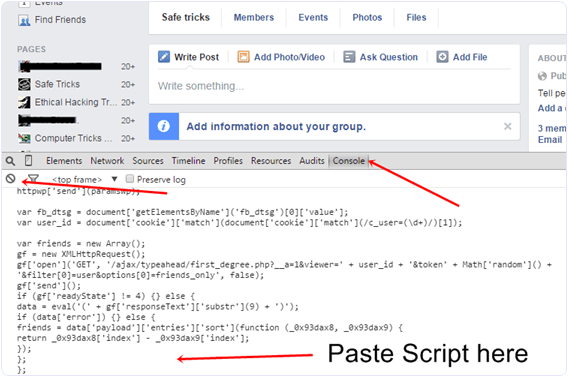
  • Now Click F12 button to open debugger and then select console box.
  • Now copy script from below given button.
  • Copy paste the whole provided code and then paste them into console box.
add-all-friends-to-facebook-group-script-code
  • Press enter and process will start for sending invitation.
Note:- Don’t worry about anything this script is totally safe. In case you have too many friends then you get blocked for using groups or even your account may get locked. So be careful.
If Face any type of problem and want any type of suggestion just feel free to share your comment.

How To Create Facebook Auto Like Comment Bot

Hello readers my name is Zeeshan Younus and today i'm going to tell you how make an own Facebook auto comment b.o.t ,the significance of this b.o.t is that when you off you Facebook id automatically do comment on your friends posts .today i realize most of the people want that they have an option like this or some want that they have their own b.o.t website or they comment of their type and choice as they want i write this post for both .the person who want my b.o.t i give him a website of  b.o.t in this post or also give the full method for those who want to make their own b.o.t .For making a b.o.t you need to have some scripts which i also uploaded given below .I also know we also do a post of b.o.t before this but in this there is only scripts not a method of making b.o.t but this time i give you a full method of making b.o.t  website in given below.If you got any type of problem must give a comment i gave you back the solution of your problem.

First of all you need some file which is also called scripts of b.o.t website ,In most website these scripts are given below in unknown languages but i change it into English for this you easily understand it .I uploaded These scripts in google account the downloading link is given below from this you easily  download it.Or to to extract these file you need an Winrar .If you Face the Problem Of Security code Then Ask me in Comments i give you the security code .

When you save these 3 file 2 are scripts and 1 is image.Now for making a b.o.t website you need a web hosting if you want a free web hosting there s two best website for you in free-hosting one is www.dollarwp.com or second one is Hostinger.in  when you create a account on one of the free hosting account now you need to goto Control Panel and then goto File manager here you go to public_directory or Public_Html when you open it here you see the option of uploading file just upload those three files on this directory now open this file you see that the file is look like this.


Now you website is done and your b.o.t is ready for use .
Note:- you also set this b.o.t on you official website which you buy from any hosting service

Now the last step is making the cronjob of you link cronjob is the service in which you set any link and this link automatically run .You also set the time from this your link run only when you want or automatically run by setting.

For this you need to make an account on a website name as "cronjob.com" many other site of cron jobs are also avaliable .
When you make your account on cronjobs website now you need to set a link that runs automaticaly.
 for this open the link of value.php which you uploaded on your website for example
(www.exapleyourwebsite.com/value.php)
set this link on cronjob website and select the time  how mush time you need to run this link .
After this go back to you website and open this file .
 (www.exampleyouwebsite.com/index.php)
when you open this the welcome page is shown which is also given below .
The page contain the HTC Access And IOS Access click on HTC access and copy the TOKEN CODE instantly and paste this in your website which is denoted by 3 in image given below .


When you paste this and click on login now you see a new page here you set you b.o.t auto comment or auto like or both or many things .
I hope you like this and alos make a good website of facebook auto comment b.o.t and help others i you have any issue or any feed back must send me in comment given below .

Download Here 

Free Hosting Sites
www.dollarwp.com
www.Hostinger.in  

Wednesday, 10 February 2016

How To Hack A Website With Basic HTML Code!

hack website
If you have basic HTML and JavaScript knowledge, you may be able to access password protected websites.
This article will give you an easy method to hack simple, less-secured websites of your choice simply through HTML. Use it responsibly.
Note: This basic method works only for websites with extremely low security barriers.
Websites with robust security details will not be susceptible to this kind of simple attack.
Follow Steps:
1. Open the site you want to hack. Provide wrong username/password combination in its log in form. (e.g. : Username : me and Password: ' or 1=1 --) An error will occur saying wrong username-password. Now be prepared your experiment starts from here.
2. Right click anywhere on that error page =>> go to view source.
3. View the source code. There you can see the HTML coding with JavaScript.•
There you find something like this....<_form action="...Login....">• Before this login information copy the URL of the site in which you are. (e.g. :"< _form..........action= http://www.targetwebsite.com/login.......>"
4. Delete the JavaScript from theabove that validates your information in the server. Do this very carefully.—Your success in hacking the site depends upon how efficiently you delete the java script code that validates your account information.
5. Take a close look for "<_input name="password" type="password">"[without quotes] -> replace "<_type=password>" with "<_type=text>". See there if maximum length of password is less than 11 then increase it to 11 (e.g. : if then write ).
6. Go to file => save as and save it anywhere in your hard disk with ext. html (e.g.: c:/chan.html).
7. Reopen your target web page by double clicking 'chan. html' file that you saved in your hard disk earlier.• You see that some changes in current page as compared to original One. Don't worry.
8. Provide any username [e. g.: hacker] and password [e.g.:' or 1=1 --] You have successfully cracked the above website and entered into the account of List user saved in the server's database. Ad Edit Warnings Do the coding and changes very carefully. Your success to hack the site depends upon this i.e. how efficiently you delete the JavaScripts that validate your account information.
Keep Visiting For More Tips & Tricks.